


Post 3 of 5 in our series on AI-assisted code and accessibility.
So far in our series on AI and accessibility, we’ve covered two key points:
- LLMs don’t produce accessible code by default.
- Prompts can improve results, but not enough, and not reliably so.
In this post, we’re going to cover the most well-known example of a third approach to using LLMs in combination with agentic coding, and that’s to use a skill.
In the world of agentic coding, a skill is a reusable, task-specific set of instructions, knowledge, and procedures that an operator can give an LLM. They are versatile, in that they can include not just instructions but also copies of correct and incorrect code examples, scripts for running third-party tools, and rules. Once the skill is built, it can be invoked easily when a relevant task presents itself, and all of the information in the skill doesn’t have to squeeze, over and over again, into the prompt window of an LLM.
Researcher Michael Fairchild, who’s a key figure behind the LLM A11y Eval project that we have cited before, published a skill in May 2026 called Building Accessible UI. Fairchild published some promising results, so we decided to add to the state of knowledge here by running and documenting our own tests using it.
Our results were also good. But they were also, as it turns out, not nearly good enough.
Setting up the experiment
A skill like Building Accessible UI works best at code-generation time: it rides along while the model writes the code, steering it toward accessible patterns and checking the output as it goes. So that is what we tested. We returned to the nine-app protocol from our first two posts: three models, three frameworks, one identical single-page app spec, this time with the skill installed and invoked during the build. For comparison, we ran the same protocol with Evinced Harness, our MCP-based detection and repair tooling, in the loop instead. (Skill runs used GPT 5.2, which had replaced GPT 5.1.)
First, a reality check on model progress: benchmarked for a separate study, every newer model still produced frankly terrible accessibility results out of the box, several worse than their predecessors.
Exhibit 1. Baseline Accessibility Performance of Models, with Release Date
| Model, Release Date | Errors* | Model, Release Date | Errors* |
|---|---|---|---|
| Claude 4.5 Sonnet, Sept 2025 | 36 | Claude Opus 4.8, May 2026 | 94 |
| GPT 5.1, Nov 2025 | 46 | GPT 5.5, Apr 2026 | 64 |
| Gemini 2.5 Pro, Mar 2025 | 53 | Gemini 3.1 Pro, Feb 2026 | 51 |
Average critical + serious accessibility errors made when building our reference app, as measured by Evinced using default settings.
The newer models did not just fail to improve: for two of the three vendors, the newest model shipped substantially more critical and serious defects than its predecessor. Claude’s count nearly tripled, and GPT’s rose about 40%, with only Gemini holding roughly flat. The trend is not slowly improving. It points the wrong way.
“Wait for better models” is not a plan we would recommend.
Counting defects, not echoes
A methodology note. Scanners count instances: one broken checkbox row, repeated 46 times in a list, counts as 46 issues when it is really one mistake. So in this post we count components: distinct root causes, deduplicated by issue type and element pattern. It is the more conservative number, and the one a developer actually has to fix. We also limit the counts to critical and serious defects, the two grades that block or badly impede assistive-technology users.
The work to be done
So what did the unguided models build? They built 9 baseline apps, with: 18.1 defective components each, on average. Exhibit 2 shows the breakdown by type:
Exhibit 2. Baseline Component Accessibility Defects by Type
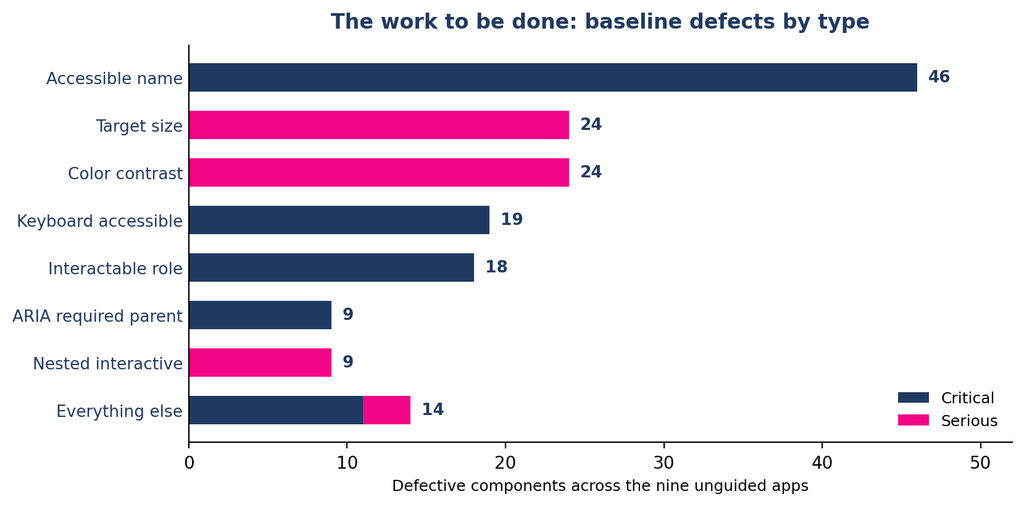
Controls with no accessible name, keyboard access, or proper role make up most of the critical defects. Target size and color contrast dominate the serious defects, with a tail of ARIA structure and focus-order problems.
This is the to-do list any tool would need to clear. How did our models and skills perform?
The results
Here is how each approach handled it.
Exhibit 3. Defective Components Per App Built, by Approach
| Approach | Critical | Serious | Critical + Serious | Apps with Zero Critical Defects Remaining |
|---|---|---|---|---|
| No guidance | 11.4 | 6.7 | 18.1 | 0 of 9 |
| Accessibility prompt (see post #2) | 1.2 | 11.9 | 13.1 | 6 of 9 |
| Building Accessible UI skill | 2.1 | 5.8 | 7.9 | 4 of 9 |
| Evinced Harness | 0.0 | 0.7 | 0.7 | 9 of 9 |
Averages are across nine apps (three models, three frameworks), measured by Evinced Web Flow Analyzer.
As a topline note, the skill is the best free option we have tested. It cut critical components by 82%, a large improvement over baseline. And while this is marginally less effective than the accessibility prompt alone, its improvement came without the accessibility prompt’s surge in serious component defects. If your budget is absolute zero, the skill is a better choice than the prompt.
Of course, the “free” option could still turn out to be quite expensive, and even putting aside token costs. Note above that none of the free options get to true accessibility. What you save up front will be spent on the manual effort to find, reproduce, assign, fix, and verify everything that was missed. And while that plays out, your site or app will be inaccessible in some way to some people.
Exhibit 4. Percent Reduction (and Increase) in Critical and Serious Defective Components Per App, By Model and Trial
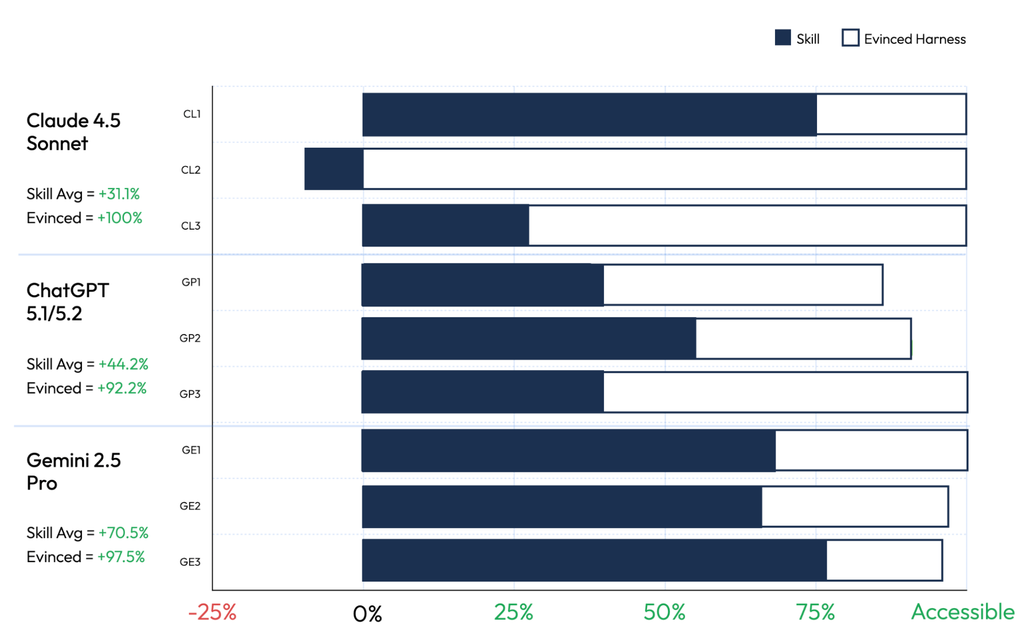
Accessible = a 100% reduction in autodetected critical and serious defects.
Frameworks: 1 = React + Bootstrap, 2 = Svelte + Tailwind, 3 = Plain JS + CSS.
Looking at the skill’s performance by trial, note that in at least one trial – Claude 4.5 paired with Svelte and Tailwind – the skill actually made things worse. But by and large it had a positive impact.
On balance, the net improvement from the skill was slightly less than half that of Evinced Harness, our own tool for helping developers build, test, and fix code for accessibility. Across everything we have measured in this series, Harness is the only approach that gets to zero components with critical defects.
The takeaway
Given that the skill did show some improvements, we asked ourselves whether it could perform better. Our best answer, at the moment, is that this current performance for a free skill is something of a plateau.
Why? Because a skill guides the model with patterns and verifies the result with checks, and a free skill must build those checks on free tools, which, in practice, means axe-core.
At this point, we are in familiar territory. In every analysis we have done, Evinced identifies dramatically more defects than axe-core, and depending on the study and methodology it ranges from 2.5X to 3.0X. (This comparison is for all types of issues, but for critical issues only the gap is often much, much wider. See also the comparative validations count in our article “What’s In a Checkpoint, Charlie?”)
So in effect, it’s not so much a limit of the skill itself, as it is of the tool it’s using to detect accessibility bugs. Anything built on a tool that has lots of false negatives (i.e., bugs it didn’t detect but should have) will itself have lots of false negatives. And strictly speaking, it’s a little worse than that. As some have pointed out, skills can help a base model pass most – but not even all – of axe-core’s checks.
This performance ceiling holds for any tool you evaluate, from any vendor. Before you ask anything else, ask what engine it is built on. Because a defect your detection tool cannot see does not go away. It ships, it waits, and one day it will grow into an expensive problem.
In our next post, we’ll examine how we can automatically and continuously monitor and repair these problems, before they have a chance to grow. See you soon.


